Showing posts with label ClassDojo. Show all posts

Tuesday, December 21, 2021

Canva: A Presentation Tool for All!


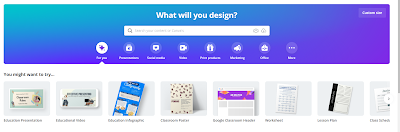
The first thing I want to say is that educators can get a FREE subscription. It is rare that educators get anything for free, especially an amazing tech tool such as Canva.

And here's the thing. You don't get some watered down version of Canva for free, you get PRO features. You can use these features to "create lessons, learning materials, and activities in minutes." I used what they said on the site, but being an avid user myself, I can say that this is in fact, a true statement.

Why Canva?

I can't even go into all the ways you can use Canva in your classroom. My goal is to get you to check it out out, and play around with it yourself.

I love that I was able to set up a classroom where their work is shared with me. I can review it, and leave feedback, and/or return if something needs to be edited. I can also create assignments for them.

I love to use it myself for a variety of things, but I love to use it with my students because it is so easy for them to use. The other day, I told my students that they could use Canva to create Christmas cards for their family. 

Christmas card

They came up with the most beautiful cards, choosing from the multitude of Christmas Card templates Canva has to offer. One of my students even taught me how to add audio to the card.

I then shared the cards with their families on Classdojo, using the link provided by Canva.(On this card, the characters are actually animated.) My parents were so touched by their cards.

We also created book covers when we were working on a narrative fiction unit. Check out the
example.

At the beginning of the year, I had my kiddos create posters showing how they feel about Math.

"What is Math?" poster
The templates make it sooooo easy! I can't wait until I introduce presentations using video. I am excited to see what my students do with that.

If you only use one tool for presenting this year, choose Canva!

Monday, June 18, 2012

Class Dojo-Behavior Management That Works!


ClassDojo worked, and it worked all year! Another good sign, I used it the entire school year! Whether I used it on my smartphone, standing at the door, my laptop, desktop, or just let students put their own points on the Smartboard, it worked!

You can create your own list of behaviors, positive or negative. When you award a point, it makes a distinctive sound.
"Dojos", as they became affectionately known, were worth their weight in gold in my classroom. :)
The students are able to choose their own avatars. (Point system works great with this option.)
The video above gives a basic explanation, but new features were added throughout the year.
The students were given codes to access their accounts online, this  made them invested in their behavior.
("Wow, look at how many Dojos I got for "Working quietly!", as they read their pie graph)

You are able to email reports to the parents. I was also able to print an End of the Year performance charts for each student.  The kids were begging me to print the reports at the end of the year.
I would begin the school year with this. I presented this at a meeting in my school. Days later, the most reluctant teacher was using it, it is really that simple!

I used positive behaviors the most with my class last year, and gave out a prize from Five Below to the student with the most points. But teachers use what is best for them.

The customer support is stupendous!They are on Twitter @ClassDojo. If you are a member of Edmodo, they have a ClassDojo community, so any questions you have can be answered immediately.

All I know is that it will be on my Smartboard again next year!


Canva: A Presentation Tool for All!

The first thing I want to say is that educators can get a FREE subscription . It is rare that educators get anything for free, especially an...